

Pending Issuance
View access is assigned to Standard users by default. Standard users may need adjusted permissions to perform actions on lots in this tab.
Subscriptions that have been settled and are ready to be issued move to the Pending Issuance tab.

For subscriptions pending issuance, you'll need to implement the following endpoints:
Get Assets Details (filter to return assets under the security ID with Pending Issuance status)
Issuing Securities
To issue securities for all subscriptions:
Click Run Current Close to issue securities.
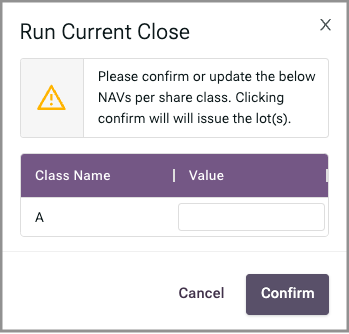
Confirm or correct the NAV for each share class.
Click Confirm.
To review subscriptions for issued securities, click All Transactions in the menu on the left.

For issuing securities, you'll need to implement the following endpoint:
Canceling a Lot
To cancel a settled subscription:
Click the Lot ID link.

Click Cancel Lot.

Click Confirm.
For canceling a subscription, you'll need to implement the following endpoint:
Last updated
Was this helpful?